HOA Amenity Reservation System with Payments
HOA amenity reservation system for residents — not commercial club-management software. Self-service facility booking for courts, clubhouses, guest parking, and community rooms, with multi-unit inventory, fairness restrictions, Groups, optional recurring holds, board approval or auto-book, blackout dates, printable reservation passes, and optional amenity reservation payments.
What Amenity Reservations includes
Amenity scheduling is one of the highest-volume tasks for volunteer boards — clubhouse rentals, pool parties, tennis courts, guest parking, and community rooms generate constant email and phone tag. HOAResidents.com amenity reservation software lets residents check availability and book online while the board sets rules, units, overnight options, Groups for who may reserve each amenity, whether recurring bookings are allowed on that amenity, and HOA-wide booking policies once.
Capabilities include multi-unit inventory (for example Tennis Court 1 and Court 2), parking reservations with overnight/multi-day stays, booking restrictions that keep residents from taking all availability, Groups so you can allow different people to reserve different amenities (for example Owners vs Renters), optional Daily/Weekly/Monthly recurring reservations when the board enables them on an amenity, auto-book or board-approval required per amenity, blackout dates and booking hours, printable reservation passes with confirmation QR, and per-amenity QR availability posters. Core includes this booking stack plus optional Stripe Connect booking fees: money goes to your HOA’s Stripe account and HOAResidents keeps $0.
Capabilities
- Multi-unit amenities such as Tennis Court 1, Court 2, and Court 3 under one amenity
- Parking reservations with bulk spaces, overnight/multi-day stays, and vehicle details when required
- Booking restrictions (by property or resident) so households cannot take all availability
- Auto-book and board-approval required options per amenity
- Blackout dates, cleaning buffers, and booking hours
- Printable reservation passes with an official confirmation QR code
- Per-amenity QR posters for on-site public availability
- Calendar views for residents and the board
- Restrict amenities to Groups so different people can reserve different spaces (e.g. Owners vs Renters)
- Optional recurring reservations (Daily, Weekly, or Monthly) when the board enables them on an amenity
- Optional booking fees via Stripe Connect — money goes to your HOA’s Stripe account; HOAResidents keeps $0
Amenity fees and Stripe Connect
Amenities stay free until the board adds a booking fee. Connect Stripe on Settings → Billing, then set an optional fee in USD on any amenity. Residents pay that listed amount at Stripe Checkout when they book.
Money goes to your HOA’s Stripe Connect account. HOAResidents keeps $0 of amenity reservation payments — there is no platform cut on these charges. Stripe’s card processing comes out of what the association receives. A fee does not require board approval, and paid reservations cannot use a recurring series in this version.
In the product
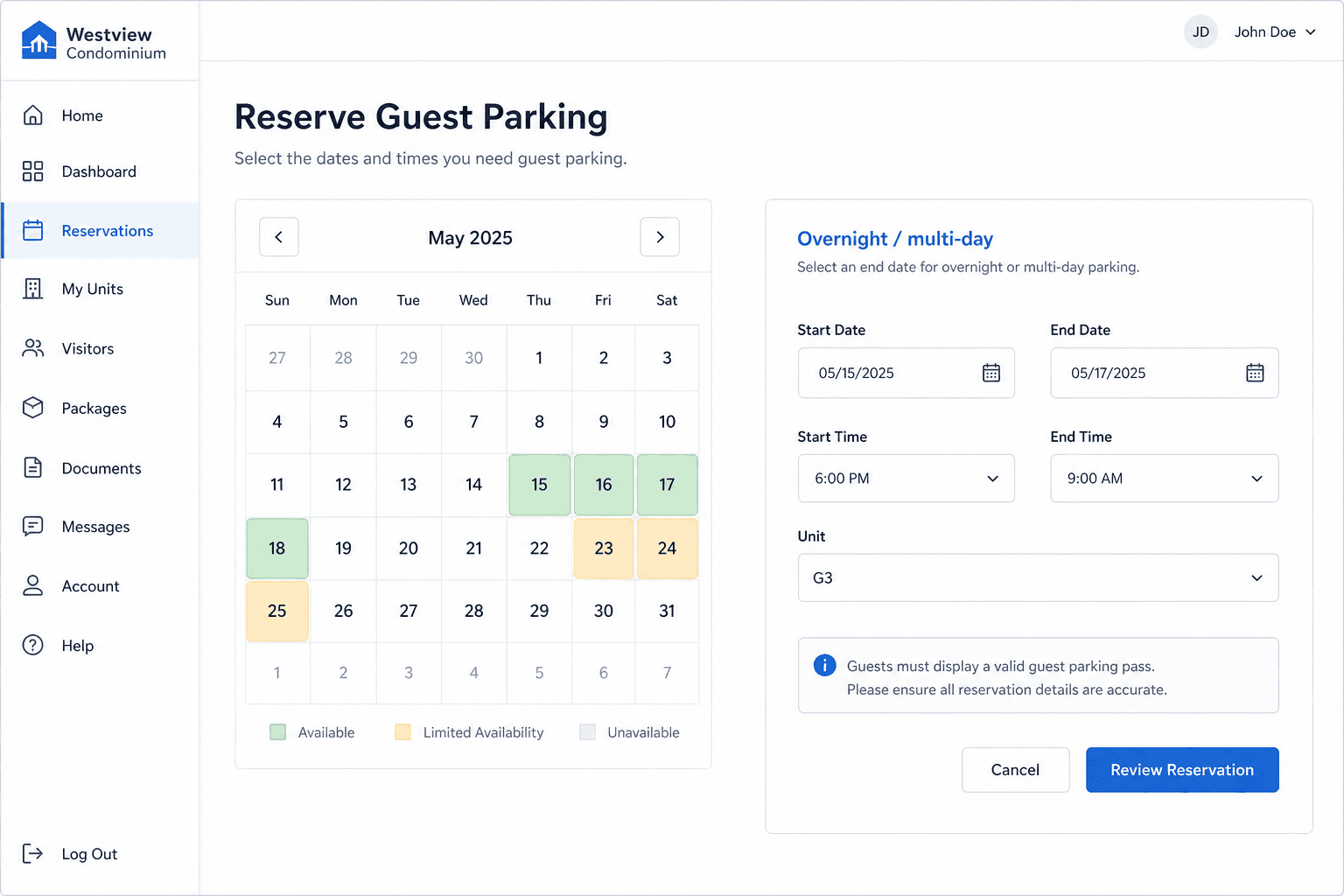
Guest parking spaces with overnight booking — residents pick start and end across days. 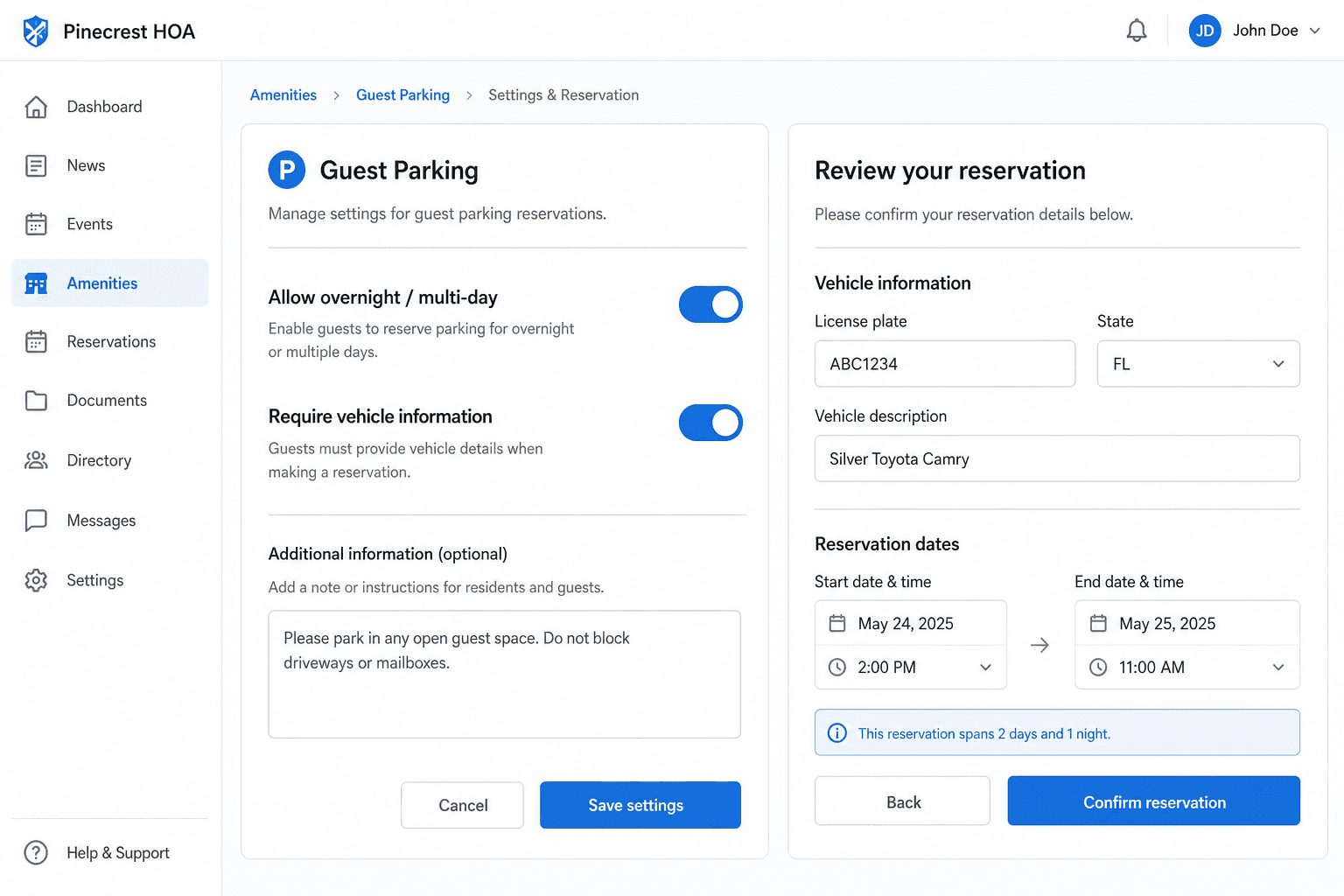
Require vehicle details when needed, and enable overnight/multi-day stays per amenity. 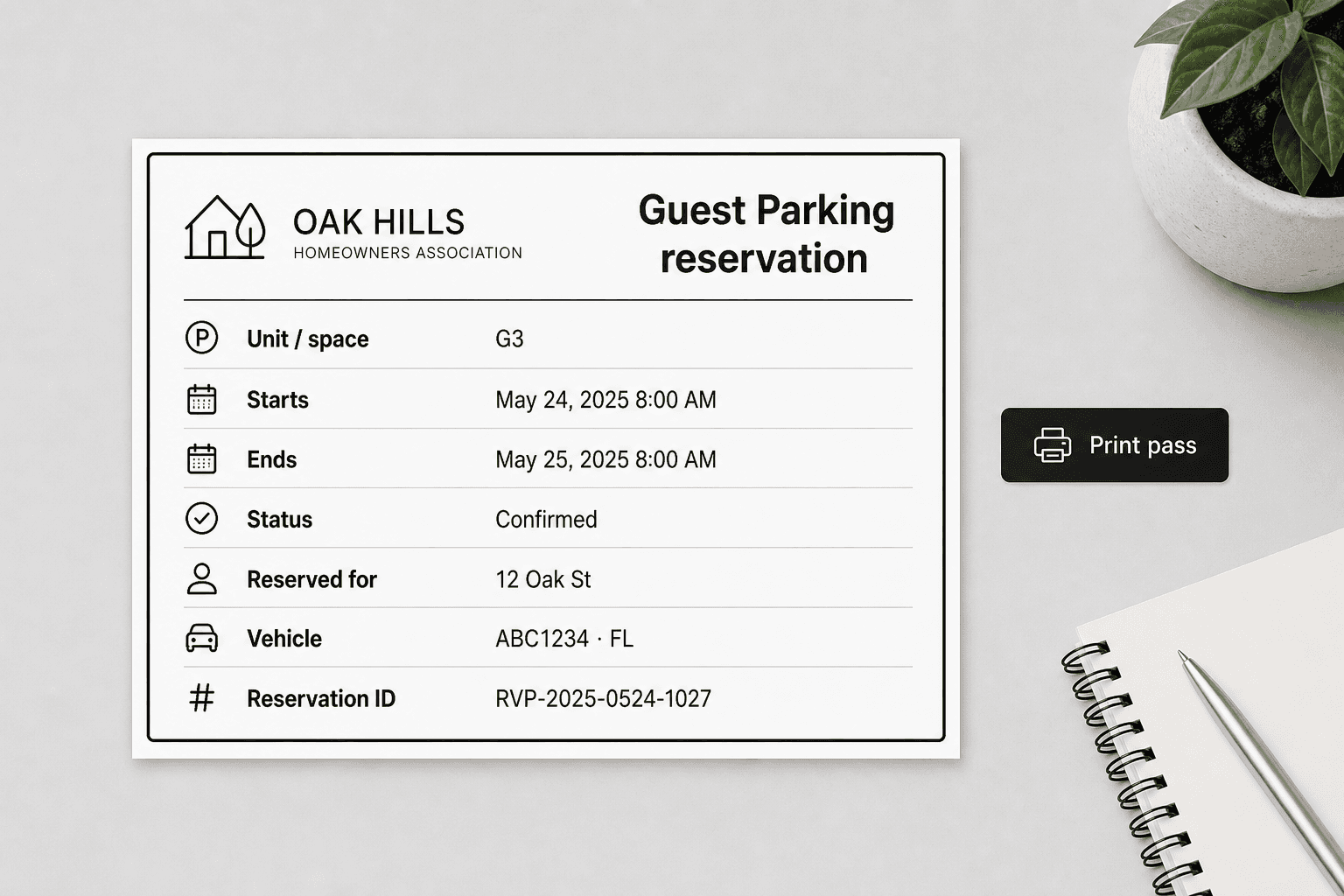
Print a Guest Parking reservation pass with the space name for multi-unit amenities.
Amenity reservation scenarios
Guest parking with bulk spaces
Create Guest Parking with spaces G1–G48 in one bulk action. Residents reserve a free space overnight when you allow multi-day stays, enter a plate when required, and print a Guest Parking reservation pass showing the space.
Multi-unit courts and rooms
Add Court 1, Court 2, and Court 3 under Tennis Courts. Residents pick a unit or take any available one — the amenity stays bookable as long as at least one unit is free.
Per-amenity QR posters for pavilion and courts
Print a unique QR poster for each amenity with a custom headline and notes. Guests and residents open that amenity’s public page to see upcoming time blocks without logging in, then sign in to reserve.
HOA-wide booking policies that reduce disputes
Set by-property or by-resident limits for the whole HOA — not one-off household exceptions — and optionally tighten rules on weekends or holiday date ranges so popular amenities stay fair.
Clubhouse and facility booking
A resident books the clubhouse or pavilion for a Saturday event, sees open slots on the calendar, and submits a facility booking request. The board approves if required.
Printable reservation passes
After confirmation, residents and the board can print a pass titled like “Guest Parking reservation” or “Tennis Courts reservation.” Multi-unit amenities also show the unit or space (for example Space G3) plus vehicle details when collected.
Key benefits for volunteer boards
- Self-service HOA facility booking for clubhouses, pools, courts, guest parking, and community spaces
- Multi-unit real-time availability with bulk space create for parking lots and court banks
- Overnight and multi-day bookings when the board allows them
- Optional required vehicle details and printable reservation passes for confirmed bookings
- Unique printable QR posters per amenity with custom headlines and notes
- HOA-wide property and resident booking policies with day and date overrides
- Calendar view shows availability at a glance for residents and the board
- Groups so different people can reserve different amenities (e.g. Owners vs Renters)
- Optional recurring reservations when the board enables them per amenity
Frequently asked questions
- Do all reservations require board approval?
- You configure the workflow. Some amenities can be instant bookings; others can require board approval before they are confirmed.
- Can residents see what is already booked?
- Yes. The resident calendar shows availability, and each amenity’s public page shows upcoming time blocks (without resident names) for pavilion or court displays.
- Can we manage multiple courts, rooms, or parking spaces under one amenity?
- Yes. Add units under an amenity — for example Tennis Courts with Court 1–3 or Guest Parking with G1–G48 (including bulk create). Conflicts are tracked per unit so multiple bookings can overlap when different units are free.
- Can the board limit how often someone books?
- Yes. HOA-wide policies can apply by property (shared household pool) or by resident, optionally scoped to one amenity, with base max-open and min-gap limits plus optional day-of-week and calendar-date overrides.
- Can residents book overnight or multi-day stays?
- Yes, when the board enables overnight/multi-day for that amenity. Start and end can span calendar days up to the max duration you set (for example multi-night guest parking).
- What is a reservation pass?
- Confirmed reservations can print a pass titled with the amenity name plus “reservation” (for example “Guest Parking reservation”). If the amenity has more than one active unit, the unit or space name is included. Vehicle plate and state appear when collected. Passes are available to residents and the board from the reservation list.
- What is included in Core for reservations?
- Core includes self-service amenity and facility booking (including guest parking), overnight/multi-day when enabled, optional required vehicle details, printable reservation passes, multi-unit inventory with bulk create, per-amenity QR posters, blackout dates, approval workflows, Groups to limit who can reserve each amenity, optional Daily/Weekly/Monthly recurring reservations when enabled per amenity, HOA-wide booking policies with day/date overrides, and optional Stripe Connect booking fees. Amenities stay free until you add a fee; money goes to your HOA’s Stripe account and HOAResidents keeps $0.
- How do amenity reservation payments work for HOA facility booking?
- Connect Stripe on Settings → Billing, then set an optional booking fee on any amenity. Residents pay the listed amount at Stripe Checkout. A fee does not require board approval, and paid reservations cannot use a recurring series. Money goes to your HOA’s Stripe account; HOAResidents keeps $0.
- Can different people reserve different amenities?
- Yes. Create Groups (for example Owners vs Renters) and attach them to an amenity so only members of those Groups can reserve it. Amenities with no Groups attached stay open to eligible residents per your usual access rules — so the clubhouse, courts, and guest parking can each allow different people.
- Can residents create recurring reservations?
- Yes, when the board enables recurring reservations on that amenity. Eligible residents can create Daily, Weekly (selected days), or Monthly series (day of month, nth weekday, or last day of the month), ending after a set number of occurrences or by a date. Amenities leave recurring off by default so most bookings stay single holds unless the board authorizes repeats.
Related features
Explore HOAResidents.com
Full platform access at no cost
Get a free HOA website with public documents, resident portal, message board, AI document Q&A, document management, and operations tools — everything included through January 1, 2027.
Sign up now and lock in Pro features at Core pricing when paid plans begin — as low as $20/month per 100 homes.
No credit card required. Personalized setup assistance available.